Start by placing your first Node: yourself. Then add your contacts and move among your friends within a spherical environment, adding all your usual files to the periphery of each Node.
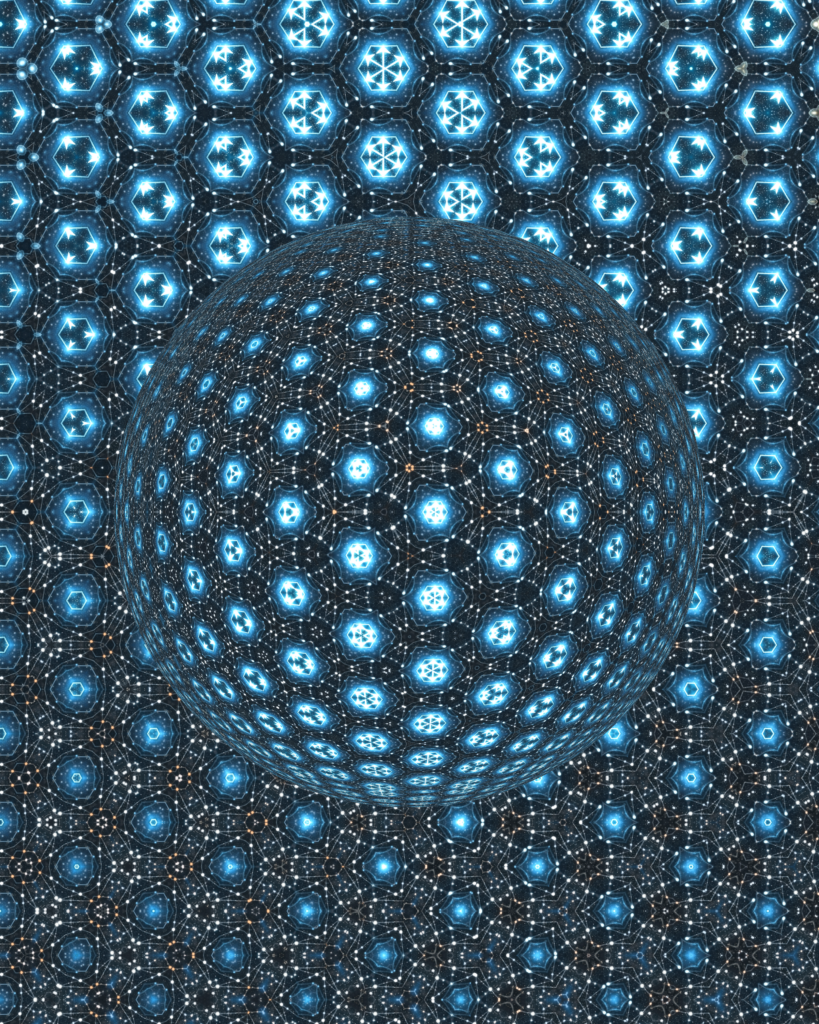
Identify them, and relate between them appropriately by pushing one to another, creating star systems, mandalas like in the picture, create control structures, that resemble merkabas like star clusters and galaxies.
hover them revealing more structures lifting the inner system circles. In older systems those were folders and files, menues and tools. Here all are stars …
The Sound Interface is a visual-spatial system for arranging one individual life, activity and make relations simpler, beautifully, and efficiently.
The Sound Interface begins where you touch your sceen and load stars onto a clear night scene like space. A user placed an image there and titled it — “Mine” for instance “Joseph”.
With a touch on the screen, a bright star-like glow appears. You touch it and see your periphery appeares , its your area.. It faintly glows, if yoh add another star, then dragging them closer, overlaping their fields will relate them permanently within a newly shared field resonance.
Hovering over “Mine” reveals Several glowing circles: possibly 3 or 4 with extentions like “Search”. Now each of the items reveals its own peripherial field, all visually .
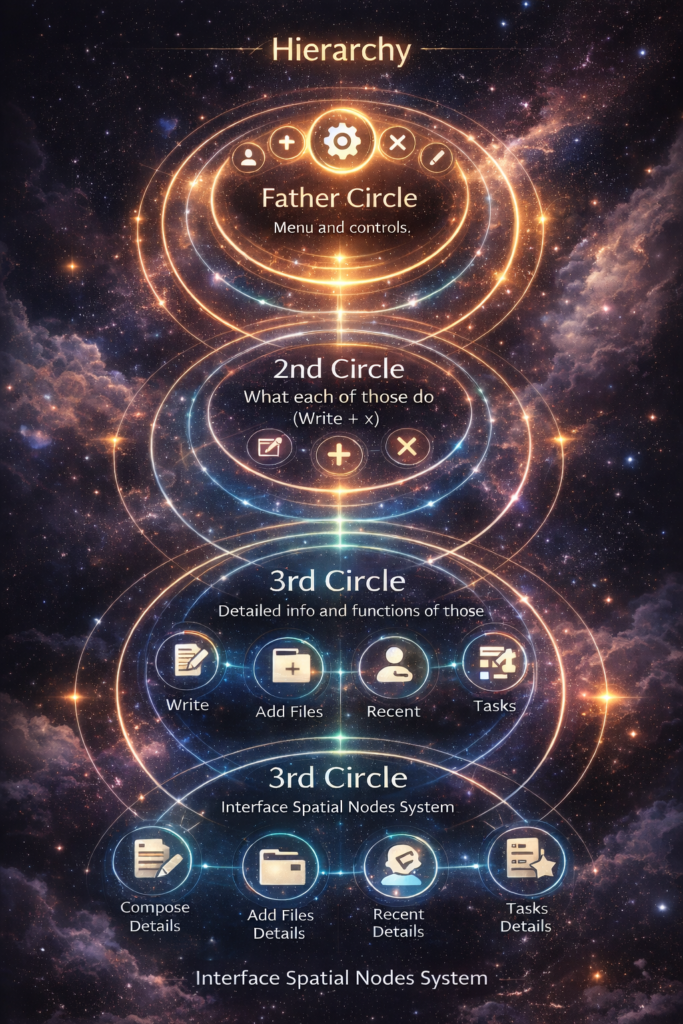
The first circle around a Node is the Menu.
The menu of an individual contact is a point of identity, presence, and connectivity.
All Stars are Nodes as well Junctions for whatever users chose to put there.
In Add, you can add info about Nodes as think if them as hubs, for instance Christ Relates to Paulus. Move them closer in your sky and the will share their Peripheries.
Allowing to connect with each from within their shared periphery.
in that case, Paulus writes a book on Paulus in the end of days, meanwhile Christ is still in his hiding.
i can share my inner space out to another or make it public altogether.
connect to the WWW is your choice.
mind you that the entire program is designed for a self and several relatives partners projecting simultaneousely
Usual files, identify them, and relate them appropriately, creating bundles that resemble star clusters and galaxies.
Around every Node a round resonance field is created on hover with more functions:
“Compose” response with a full-screen text pad. When complete, the message is sent by dragging it hover the recipient’s Node.
Drafts may be saved, refined, then sent or published.
Nodes themselves join together by dragging one into another peripheral circle, forming living networks through motion and relation.
The Sound Interface is a visual-spatial system for arranging life and communication more simply, beautifully, and efficiently.
Originals are available by direct conversation ==
Art as a parallel current. Even while wars intensify, my work keeps evolving. Creation becomes a kind of counter-movement to destruction — not denial of it, but a different direction of energy.***
Note: Titled The New Sun. Released at the Pisces New Moon — March 19, 2026, 03:23
28°26′ Pisces — within minutes of my natal North Node (28°34′)
Simple. Precise. Charged.
REVISITED BLOG enters 2-3 days progressive light period work on 2nd Andromeda..
***
for Biography scroll below
***
March 16, 2026
The Revisited works collection is a v7sual blog begins today. It marks moments when a few new or earlier paintings are changed, recreated, and guided toward a new horizon.
During these periods, a small window exists for those who dare to acquire them.
***
March 14 published my Heart Psalms — A Multilingual Prayer Series
***
My artistic work and studies in spherical geometry, physics, and visual perception form the foundation of this exploration. Through these practices I began to recognize recurring structural patterns in both spatial perception and artistic creation.
https://www.academia.edu/165068088/The_Arjuna_Moment_of_Joseph_Y_Tany
***
https://josephtany.academia.edu/
***
Joseph Yos Tany Art show https://fineartamerica.com/profiles/joseph-tany/collections/joseph+yos+tany+art+shownsfer/
As we populate this Gallery framework gather the Selected Works to Head and heart 💓
Wishing a specific place with thoughts on The
ALEGRE PYRAMID ∆ CONSTRUCTION
In their own words
Return the kingdom of God
ALEGRE PYRAMID ∆, Facebook
°=° https://www.facebook.com/groups/portugalenergytra
The Alegre Pyramid ∆ and Return the Kingdom of God.
🎨 Selected Works by Joseph (Yosef) Tany
Here are a few representative works that show some of the main artistic themes in your practice:
🌟 Landscape & Contemplative Works
Sierra Nevada, Granada (Sunrise) – A meditation on light, peace, and presence in nature, described as a scene where serenity deepens and love pauses.
Solitary Sierra Nevada – Figures at rest in a vast landscape of calm water and distant snowy mountains.
☀️ Symbolic & Transformational Pieces
Sun Painting – Oil work inspired by light and uplifting feeling, meant to inspire ascension of the viewer.
Why Is Art – A more introspective/abstract portrait-print exploring inner states via color and expression.
🔥 Major Thematic Work
Victory of the Light – A large, limited-edition oil on canvas focused on empowerment and shared heart experience with audiences.
🎨 Note: Joseph Tany’s online catalog shows a wide range of paintings, photography, sculpture, drawing, and mixed media with thematic series like Twinflames, Plainair Earth, Spheres In Motion, etc., spanning 70+ works.
❤️ Themes of Head and Heart
From available artist statements, your work repeatedly weaves together intellect and feeling — using light, landscape, and color not just to depict the world but to invite contemplation, inner peace, and an emotional return to essentials of life and love. This seems to align deeply with the idea of head (concept/vision) and heart (experience/emotion). Many works are not just visual but spiritual reflections — almost meditations in color and form.
🜁 ALEGRE PYRAMID ∆ — Vision in Their Own Words
While I can’t access the Facebook group page you linked directly (it might be private), here’s what public sources indicate about the project:
✨ The Alegre Pyramid is envisioned as much more than architecture — it’s imagined as a living sanctuary of art, music, and ecological harmony, where structure is sound, space is creative energy, and human presence is awakened expression.
It’s conceived as acoustic architecture, ecological habitat, cultural stage, and spiritual instrument in one.
It brings together visual artists, musicians, thinkers, and seekers in a space designed for inner alignment and creative exchange, envisioned outside typical urban cultural centers.
Joseph (Yosef) is described as Artistic Vision & Cultural Stewardship behind the project.
In your own words (and the documents you’ve shared previously), the Pyramid is tied to ideas like “Return the Kingdom of God” — which seems to be about restoring:
connection with spiritual roots
harmony between humanity and earth
art as a sacred practice rather than just aesthetics
Artist emphasis on heart intelligence, joyful presence, and the living quality of sound and geometry as keys to this return — themes that could be explored in your artistic statements/selected works.
📝 What You Could Add Next
To build the framework you’re imagining (“Selected Works to Head and Heart”), here are ideas you can expand on:
Select 5–10 artworks that best illustrate inner felt experience + conceptual vision (e.g., light, return, resonance, stillness).
Write a brief statement for each about how it expresses:
🧠 Vision/Idea
❤️ Emotional/Heart Experience
🜁 Connection to Alegre Pyramid themes (if relevant)
Gather quotes or captions from my own reflections on site:
Below is a structured, exhibition-ready framework you can use for:
Fine Art America collection
🎨 JOSEPH YOS TANY — SELECTED WORKS
Head ∆ Heart
A Curated Path Toward The Alegre Pyramid
I. ☀️ THE LIGHT PRINCIPLE
(Vision / Consciousness / Divine Return)
1. Victory of the Light
Head: Triumph of clarity over confusion.
Heart: Shared empowerment — light as collective awakening.
Pyramid Link: The Pyramid as amplifier of light-consciousness.
2. Sun Painting
Head: The sun as source-code of life.
Heart: Warmth, hope, vitality.
Pyramid Link: Apex geometry aligned with solar intelligence.
II. ⛰ THE EARTH & STILLNESS SERIES
(Grounding / Peace / Return to Origin)
3. Sierra Nevada (Sunrise)
Head: Observation of natural order.
Heart: Silence before movement.
Pyramid Link: The foundation — rooted in land, not ideology.
4. Solitary Sierra Nevada
Head: Individual within vast creation.
Heart: Sacred solitude.
Pyramid Link: A sanctuary for contemplation.
III. 🔥 THE TRANSFORMATION WORKS
(Inner Conflict / Alchemy / Becoming)
5. Why Is Art
Head: Questioning the role of creation.
Heart: Vulnerability in expression.
Pyramid Link: Art as sacred inquiry.
6. Spheres in Motion
Head: Geometry as dynamic system.
Heart: Energy in relationship.
Pyramid Link: Spiral gardens + acoustic movement.
***
Artist Note: Feb 21 26:
From today and throughout March, I will present three new abstract figurative paintings, each measuring 100 × 120 cm, offered especially for you, the collector.
***
Artist Note: Feb 20 26:
Before the grid system shuts down, preparing for a new world—a world many foresee as a new era of communication and action—I am choosing to begin Anew. My plan is to focus on large oil paintings of landscapes and flowers. My ideal is Georgia O’Keeffe, so I ask you to be hopeful and expectant with me.”
— Yosef
***
Feb 19 26:
The reunion of my art with the artist must begin with reflection — a careful consideration of the entire field of return. Before any action is taken, it is necessary to reduce and remove the stress that has cast a heavy shadow upon this path, so that what unfolds may arise from clarity, balance, and right intention.
To understand the reunion, one must first understand the separation.
For many years, my works traveled with me across countries and continents. I carried nearly three hundred pieces, and the collection continued to grow wherever life placed me. New works were created in Paris, Barcelona, London, New York City, Santa Cruz, and Los Angeles, California. The final works of that chapter were created in Hotevilla, Arizona, just before I left America at that time.
The art journeyed by sea and air shipments, crossed waters by ferry across the English Channel, and moved by car across America. The works were not static objects but companions to a living path of creation — unfolding alongside the experiences that shaped them.
In 2012, I left the works in San Clemente. The simplest explanation is that no clear and tangible destination had yet been found to receive them. There was no specific host, no prepared place, no defined future for the collection. The works were waiting for their rightful setting.
They remained in trust until Darren Taylor, my dear friend, took them into his care. Today, the works are safely kept in his house, preserved in his attic office, where they remain while we seek to establish the deeply desired reality of their reunion with the artist.
The reunion itself depends on the emergence of the right conditions. Simply put, it may unfold in one of two ways: either the artwork is sold and thereby finances its return and future path, or a third partner enters the equation — a person or institution who offers a destination and makes the reunion possible.
This process is not merely logistical. The reunion of the art may begin with those places and people who are naturally inclined toward its emotional language — where recognition already exists, and understanding arises without effort. The works must return where they are truly received.
Thus the path unfolds in stages: the journey of the works, the separation, the period of waiting, their preservation in care, and the eventual emergence of the conditions that will allow their return.
The reunion of the art with the artist is therefore not only a physical act, but a restoration of continuity — a return shaped by clarity, resonance, and the right meeting of circumstances.
/=/
Feb 1 2026 : PORTUGAL ENERGY TRANSFER (PET)
The Alegre Pyramid Auditorium
A Cultural & Acoustic Landmark in Portugal
Initiated & Designed by Architect Heine Cronje (Cape Town)
Artistic Vision & Cultural Stewardship: Joseph Tany (Yosef)
Project Overview
Portugal Energy Transfer (PET) is a landmark cultural project centered on the Alegre Pyramid Auditorium — a seven-level pyramid structure integrating architecture, music, ecology, and visual art into a single resonant system.
Situated in the luminous hills of southern Portugal, the Pyramid is conceived as a living instrument:
a space where sound becomes structure, and structure amplifies human gathering.
This is not a speculative real-estate venture.
It is a purpose-built cultural temple designed for longevity, relevance, and legacy.
Core Elements
Alegre Pyramid Auditorium
A multi-level acoustic hall designed for music, voice, and contemplative gatherings.
Spiral Gardens & Regenerative Landscape
Ground-level ecological systems already initiated, including productive gardens expanding across neighboring land.
Gallery & Cultural Spaces
Upper levels dedicated to visual art, exhibitions, and rotating cultural programs.
Architectural Integrity
Designed by Heine Cronje, known for visionary, environmentally conscious architecture with symbolic coherence.
Current Momentum
Architectural drawings and visual materials are receiving rapidly growing exposure
The full presentation gallery on Fine Art America shows consistent growth in views and interest
On-site ecological planting is active and expanding — the project is already rooted in land
Interest from artists, musicians, and cultural figures is organically increasing
As Heine Cronje notes:
“What is planted bears fruit in its own time.”
Investment Invitation
We are now opening a second call for aligned investors — individuals or groups who understand that:
Cultural landmarks create long-term value
Purpose-driven architecture outlives cycles and trends
Legacy projects require patience, clarity, and integrity
Investment structures may include:
Architectural development participation
Cultural patronage and naming opportunities
Long-term stewardship roles
(details discussed directly)
This is a project for investors who value meaning alongside return.
Why This Matters
The Alegre Pyramid is designed to stand for generations —
a place where music, art, land, and human presence meet in balance.
In a time of fragmentation, PET offers a coherent space of gathering, built with care, intention, and restraint.
Contact
Architect & Project Initiator:
Heine Cronje
📧 HeineCronje@gmail.com
Artistic Vision & Cultural Lead:
Joseph Tany (Yosef)
If you want, I can next:
compress this into a half-page executive summary,
tailor it specifically for high-net-worth individuals, or
adapt it into a PDF layout aligned with the Alegre Pyramid visual language.
Just tell me the next move.
I prefer this response
Memory full
JAN 30 2026
Methods of Artworks (Yos)
Lately — or perhaps for long enough — I have been painting over ready pieces, for a variety of reasons.
Most often, it is the lack of materials: canvas and oil paints have become costly.
Another reason is conceptual — an idea arrives on how a piece can progress further.
When this happens after the work has already been posted for sale, I immediately limit it to prints only.
There is still another tension:
At times a piece gathers many views, keeps its price, yet does not sell.
The growing attention may then create the need to recreate the first version — or to carry it forward.
For over two years on FAA, with a steadily growing presence, not one original has sold.
This does not break my commitment — but it does frustrate me, because completing an original sale remains my deeper desire.
To relate the physical
to a divine realm.
Yos
==
*** JAN 28 2026 Note:
Sierra Nevada Lake Yam began as an oil painting, with the mountain present from the start.
The lake was later introduced digitally at the buyer’s request, shifting the proportions and balance of the work.
The result revealed a quiet beauty and now inspires a return to a fully non-digital version.
The completed Sierra Nevada Piece with oils is expected to show here in a few days.
— Yosef
==
// PDF – Artist Biography:
https://www.academia.edu/145810498/Joseph_Tany_Yos_biography_past_stations
// AATONAU:
***
Contact: josephtanyos@gmail.com
Call: 972548730554
***
Statement January 15 2026 : ***
Painting transforms my over heated desire into structures, but love survived in the stains. and the discipline of their order transformed for constructing love in life itself.
***
Yosef (Joseph Tany) – Brief Biography:
In 1977, driven by a powerful spiritual calling, Yosef moved to the north of Galilee and eventually settled in Haifa. His full commitment to painting began in 1983, when he established his first studio apartment and started exhibiting in galleries and independent shows.
Although his work attracted interest—particularly among art lovers audiences—he also faced repeated institutional rejection, including two refusals from the Israeli Artists Association. In 1990, his path shifted when French art agent Benoît Sapiro invited him to Paris and organized a solo exhibition at Biblos Gallery in the Latin Quarter. During this period, his painting Rendez-Vous 2 (80 × 70 cm, oil) was successfully auctioned at Girard Auction, and records of his work remain with the gallery. Critical reviews and sales records are archived at the Centre Pompidou, Paris.
Despite growing recognition, Yosef felt compelled to continue moving. In 1993, he left Paris and returned to Tel Aviv–Jaffa, his home. Around the same time, he graduated as a marine skipper in Haifa and lived aboard his 33-foot sailing boat moored in Old Jaffa Port, deepening a lifelong bond with the sea.
Between 1994 and 1995, supported by close friend and collector Ehud Ratner, Yosef returned briefly to Paris, then spent a year in London. By this stage, he had sold approximately 100 original works across Paris, Haifa, and Tel Aviv—primarily to private collectors. Until today early 2026, roughly 300 art works are in hands of collectors worldwide. He warmly invites anyone holding his early works to contact him, as he values knowing the journey of each piece:
josephtanyos@gmail.com
***
In 1996, while digitizing his paintings at what was then high-resolution (0.5 MB files), Izabel Saeedi introduced him to Photoshop—a medium he embraced with enthusiasm. These digital visual interpretations are now available in his Fine Art America gallery.
Encouraged by Alexandre Putov, Yosef moved to Barcelona in 1998, where he lived for three years and exhibited in two downtown galleries. His long-held wish to reach the United States came true in 2001, when Mariana Bego invited him to exhibit at Ezair Gallery, 92 Madison Avenue, New York City. Five works were acquired during and after the show.
Returning to Spain, Yosef lived in Málaga and later Alhama de Granada, Andalusia. His collection was registered with the Granada regional art ministry, and the town’s mayor granted him a vacant historic building as a studio. There, he created some of his softest and most sensual works.
In 2007, Yosef returned to the United States, exhibiting in Santa Cruz, California, at The Attic. By 2010, he traveled by van to Joshua Tree, and in 2012 continued to Los Angeles, where he joined the Occupy encampment at City Hall. And showed with Occupy at the Latino Museum Downtown.
Documentary videos from this period are available on his channel:
Watch the short movie “Colors on Metal” with his son Uzi Tany who contributed of his powerful music, how warm and exciting !!!
Later in 2012, he traveled to Arizona and fulfilled a personal promise by living with the Hopi community in Hotevilla-Bacavi.
Since 2014, Yosef has been living again in Israel—Palestine—and has resumed exhibiting new work since 2023.
***
“Blessings Now”